Built for New Zealand property

Property Intelligence, Development Feasibility and AI — In One Platform

Research any property from the official records, evaluate an investment, work out what a site can take, lay out and cost a development, generate floor plans in 2D and 3D, and share a professional report.

  • No credit card required
  • Two free reports a day
  • Every source named
Download a sample report96 Vodanovich Road, Te Atatū South · PDF, 2 MB
Landsight on a real address: 96 Vodanovich Road, Te Atatū South. More videos
From the official recordToitū Te Whenua LINZLiDAR 1 m elevationAuckland CouncilWatercareOpenStreetMap

Who it is for

One platform, four ways of working

Tell Landsight who you are and it puts your tools first. Your plan, not your role, decides what you can use — so you can always reach the rest.

Property report

Every property, from the official record

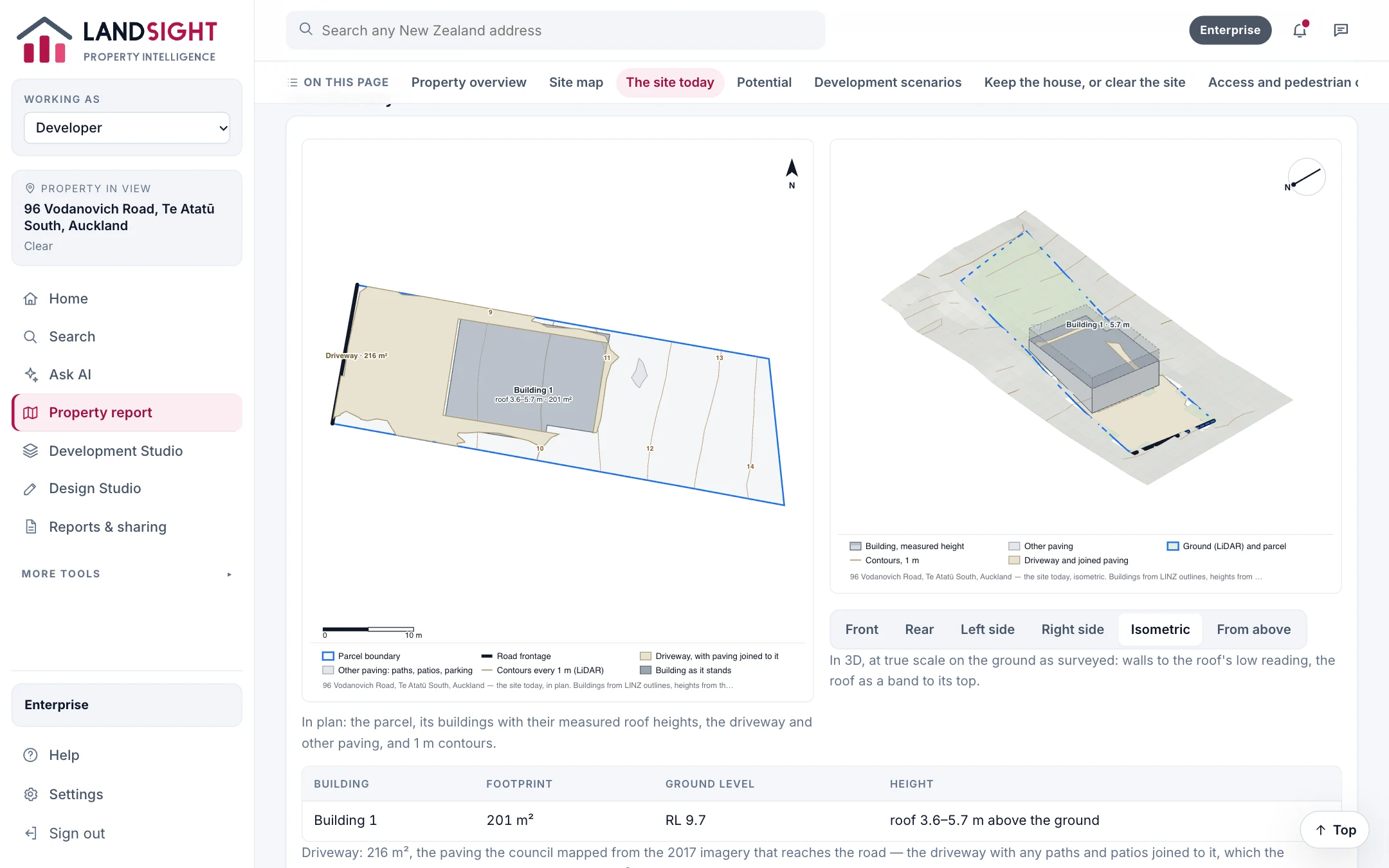
Title, parcel, buildings, valuation, zoning, hazards and the ground — on one page, with the site as it stands drawn in 2D and 3D from LINZ outlines and LiDAR.

  • Buildings with heights measured from LiDAR
  • Driveway and paving from council imagery
  • Share by link, email or WhatsApp, or save as a PDF
About property reports
The site today, in plan and in 3D, for 96 Vodanovich Road, Te Atatū South

Development feasibility

What a site can take, and what it returns

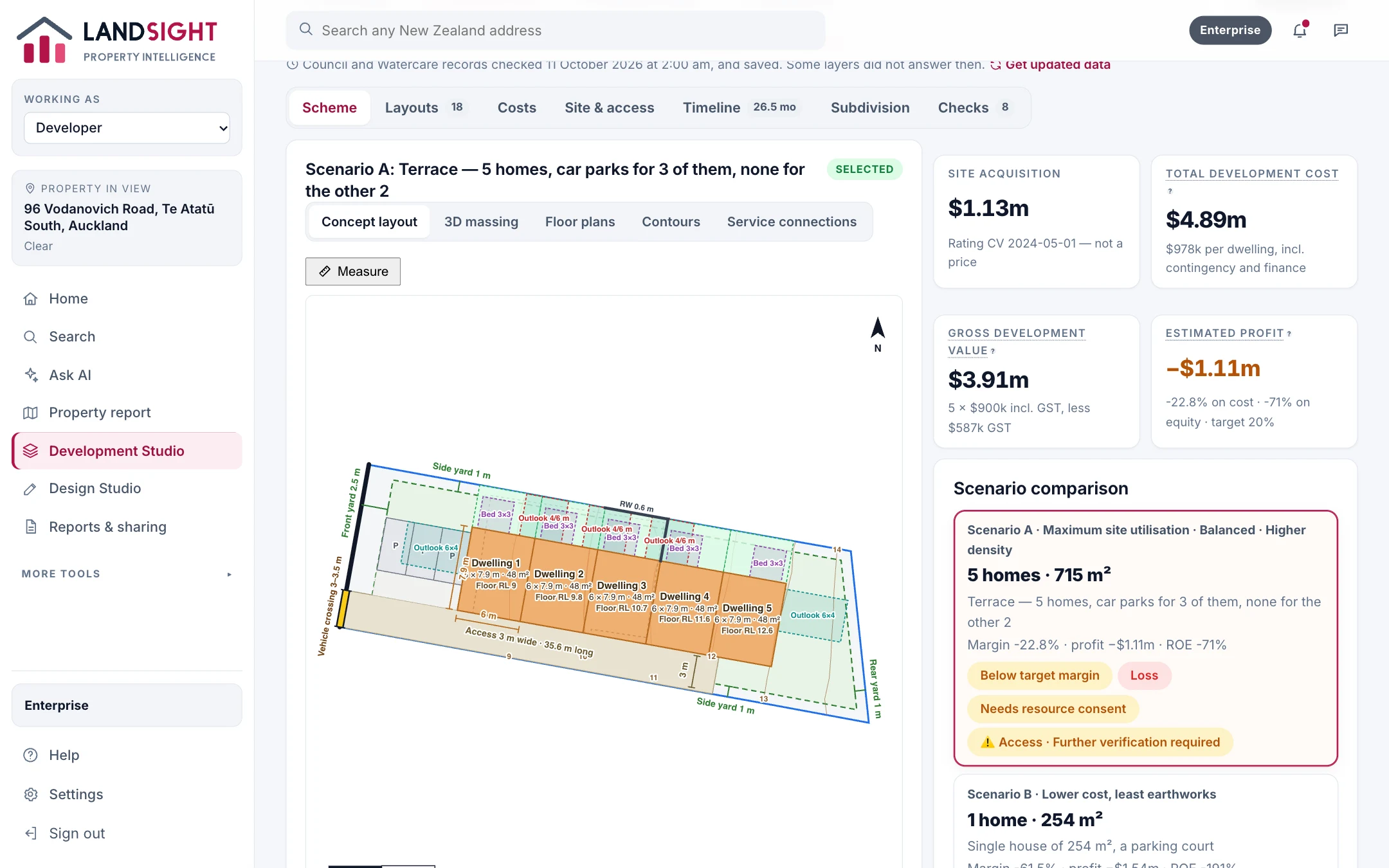
Whole-site layouts — a house, duplexes, townhouses — within the zone's rules, costed at market rates, with margin and profit and the constraint that limits each.

  • Maximum, lowest-cost, balanced and higher-density options
  • Parking, outdoor space and retaining worked out
  • Every assumption visible, and yours to change
About feasibility
Development options laid out and costed for 96 Vodanovich Road, Te Atatū South

Design Studio

Floor plans on the real site, in 2D and 3D

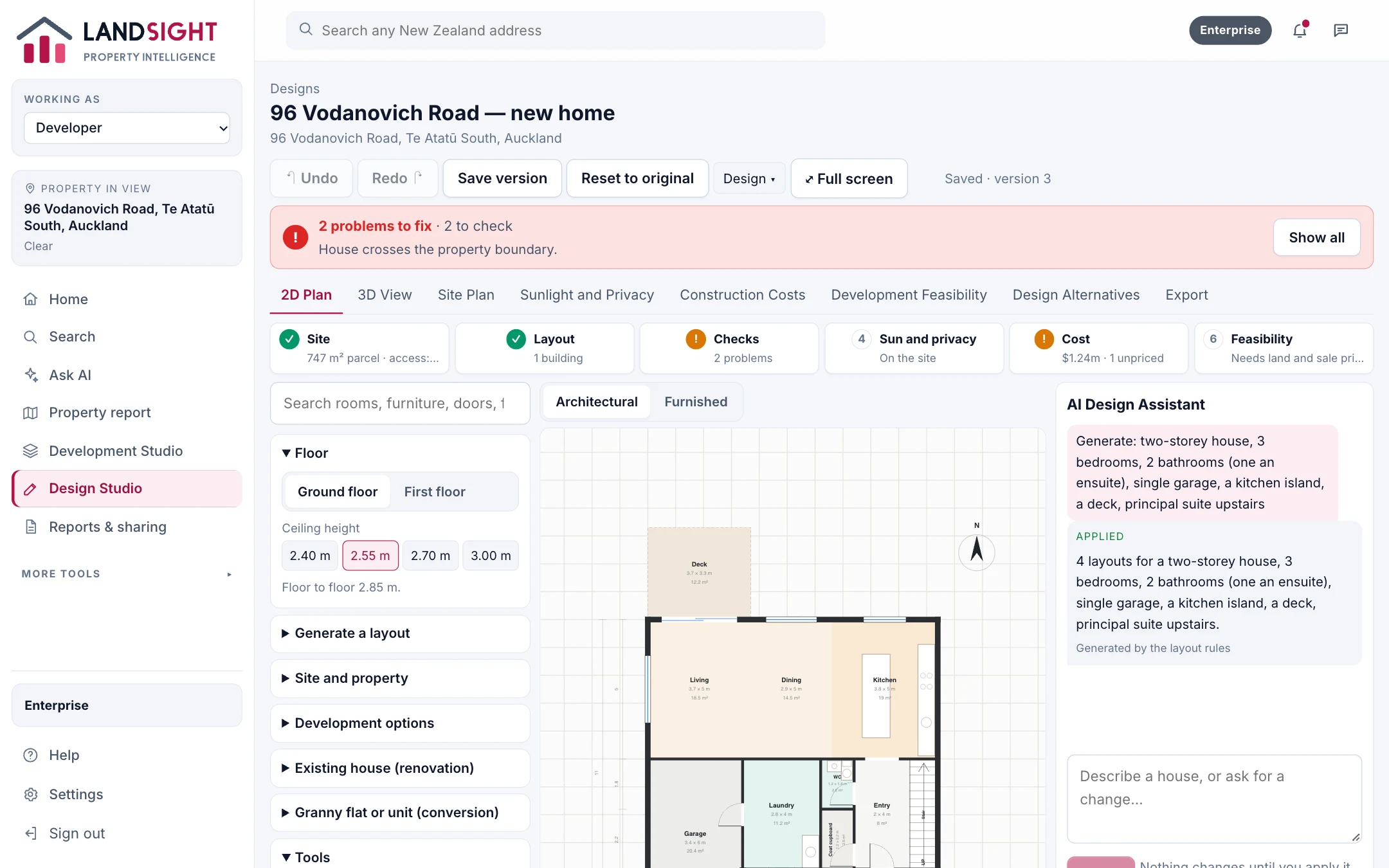
Lay out homes from a brief, change them by hand or by asking the AI assistant, and check them against the site's rules, sunlight and cost as you go.

  • Generated layouts checked before you see them
  • Sunlight, privacy and construction costs
  • Versions kept; exports to take elsewhere
About the Design Studio
A two-storey, three-bedroom design on 96 Vodanovich Road, Te Atatū South

Development workspaces

Run the development in one place

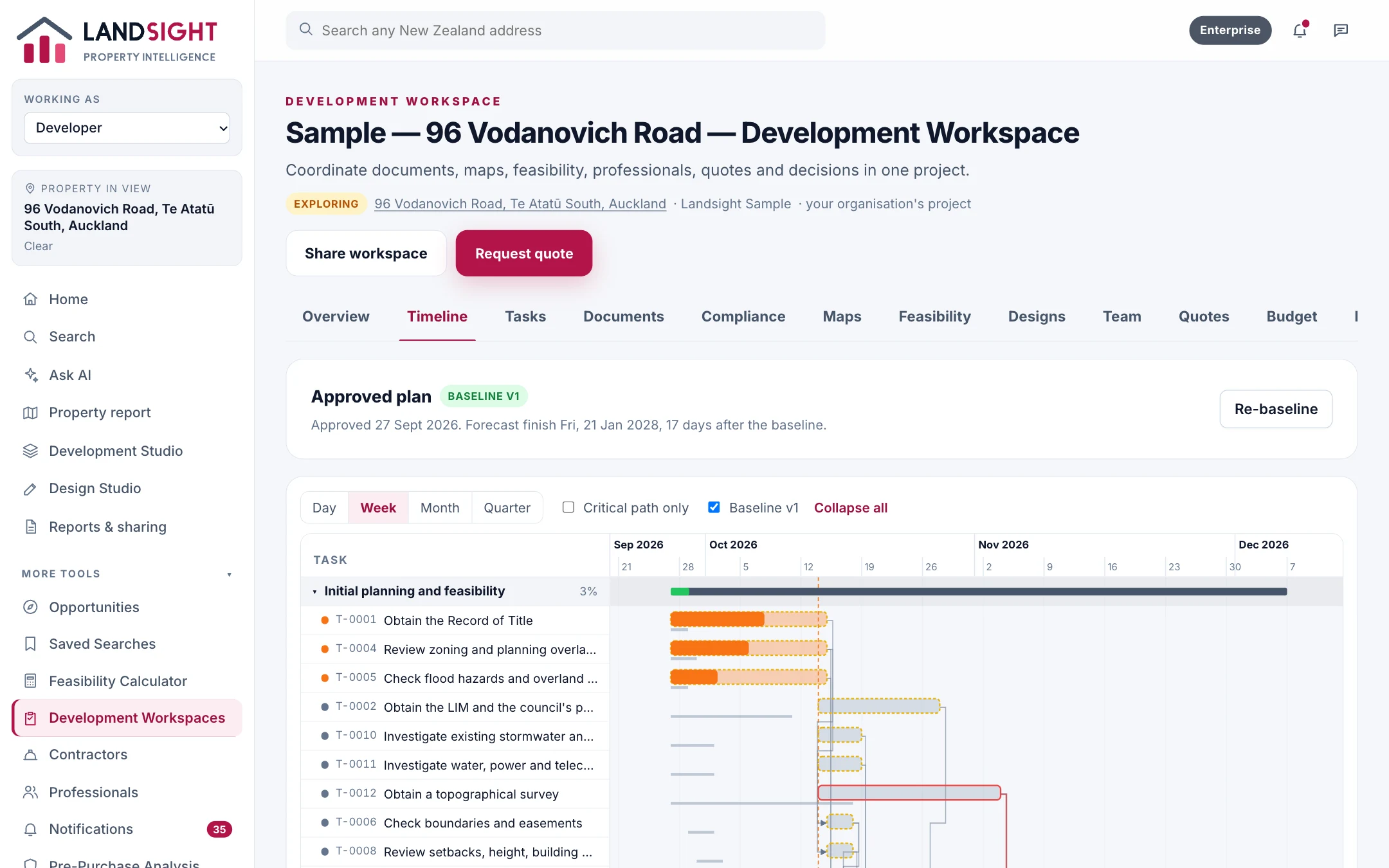
A programme generated for how it will be built, with the team, consents, inspections, quotes, budget and invoices — and outside professionals brought in to their part only.

  • Programme, milestones and critical path
  • Consents, conditions and inspections
  • Budget, commitments, invoices and progress reports
For developers
The programme for a sample development at 96 Vodanovich Road, Te Atatū South

Features

Everything from the first look to the last invoice

Property intelligence

A one-page report on any New Zealand property: title, parcel, buildings, valuation, zoning, hazards, contours, the site today in 2D and 3D, and its development potential.

Investment analysis

Work out rental yield, cash flow, borrowing costs and return on investment for a New Zealand property, with every assumption visible.

Development and feasibility

Lay out houses, duplexes and townhouses on a site, cost each option at market rates, and see margin and profit — with the constraint that limits each.

Floor plans and design

Generate house layouts on a real site from a brief, edit them in 2D and 3D, ask the AI design assistant for changes, and read an existing floor plan from a drawing.

CMA and comparable sales

What Landsight offers agents for comparable properties today — homes like it by rating value — and why it does not yet produce a CMA from sale prices.

AI property assistant

Ask about a property, an area or a development in plain words. The Landsight assistant answers from official records, names its sources, and says what it does not know.

Portfolio management

Keep the properties and developments you hold together, with their performance, and your property tax records alongside.

Maps and site analysis

A site's zone, envelope, contours, flood areas and service networks on one map, from LINZ, LiDAR and council records.

Reports and exports

Share reports by link, email or WhatsApp, save them as PDFs, and export spreadsheets and drawings to take elsewhere.

Team and enterprise

A shared workspace for property teams: properties, projects, reports and portfolios shared, with roles, administration, expanded AI and a usage dashboard.

How it works

From an address to a decision

  1. 1

    Search any address

    Type an address, or describe the site you want in your own words.

  2. 2

    Read the report

    The record, the site as it stands, what could be built, and what to check — with sources.

  3. 3

    Plan, cost and share

    Run the feasibility, design the homes, run the project, and send the report to anyone.

Pricing

Start free. Upgrade when you need more.

Starter

Free

Property search, two property reports a day and a few AI questions.

Start Free

For professionals

Premium

Every tool

Feasibility, floor plans, investment analysis and portfolios, with a monthly AI allowance.

See Premium

Enterprise

For teams

A shared workspace with roles, expanded AI, usage controls and administration.

Contact Sales

Compare the plans in full

Questions

Asked before signing up

Is Landsight free to use?

Starter is free for good: property search, two property reports a day and a few AI questions, with no credit card. Premium and Enterprise add the professional tools and more AI.

Where does the information come from?

Addresses, titles, parcels and building outlines from Toitū Te Whenua LINZ; the ground from the LINZ LiDAR elevation model; valuations, zoning, flood areas and networks from the council where Landsight has integrated it — Auckland today. Every report names its sources.

Is a report advice, or a valuation?

No. A report is a preliminary reading of official records. It lists what only a surveyor, the council or an engineer can confirm, and a council rating value is never shown as a price.

Which parts of New Zealand does it cover?

Every address in New Zealand for the national records. Council layers — zoning, hazards, services — are integrated for Auckland, and elsewhere a report says what it could not check.

Can my team use it together?

Enterprise gives an organisation one workspace, with roles, shared properties, projects, reports and portfolios, and an audit log. Outside professionals and accountants can be brought in to their part only.

See what is on record for your next property

Start free — no credit card. Two property reports a day, and every source named.